Apple’s iOS 26 Redesign Introduces Liquid Glass Across Devices
Apple is giving its software a bold new look — and it’s called Liquid Glass. At WWDC 2025, the tech giant revealed a sweeping design overhaul that brings a unified, visually expressive experience to iOS 26, iPadOS 26, macOS Tahoe 26, watchOS 26, and tvOS 26. While fans expected breakthroughs in AI, Apple’s biggest move was aesthetic — and it’s the most significant interface update since iOS 7 in 2013.
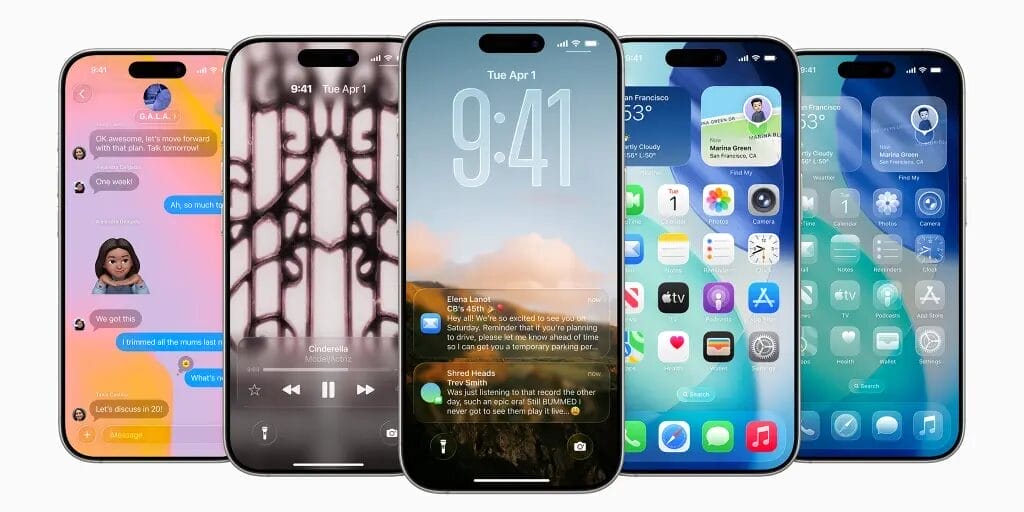
What is Liquid Glass?
Liquid Glass is Apple’s new material design language. It behaves like real glass — translucent, dynamic, and fluid — adapting to content and surroundings. This material reflects light and shifts based on context, giving UI elements like buttons, sliders, and tab bars a playful yet elegant depth.
Elements feel alive. They shimmer, stretch, and shift with your gestures — from tab bars that shrink while scrolling to icons that glow and refract across devices. The design is uniform across platforms, yet maintains the personality of each Apple product.
iOS 26 Brings the Change to iPhone
In iOS 26, every interface feels lighter and more responsive. The Lock Screen clock now floats behind the subject of your wallpaper. App icons, widgets, and the Dock have been redesigned using layered Liquid Glass, supporting light, dark, tinted, and clear modes. Animations have been refined to feel more tactile and organic.
The Messages app gets upgraded with live translation, custom group backgrounds, and interactive polls. You’ll even see typing indicators in group chats. New spam detection tools also help sort unknown messages and calls more cleanly.
Expressive. Delightful. But still instantly familiar.
— Tim Cook (@tim_cook) June 9, 2025
Introducing our new software design with Liquid Glass. pic.twitter.com/8hA0q2aCTf
Apple Watch, Mac, iPad, TV — All On the Same Page
Liquid Glass isn’t just for iPhones. From MacBook Pros to Apple Watch Series 10, the redesign is everywhere. macOS Tahoe 26 lets users personalize their desktops with widgets and Liquid Glass icons. The menu bar is now fully transparent, creating a seamless visual flow.
iPadOS 26 brings Mac-style multitasking to the iPad, including floating windows, resizable apps, and a menu bar. It finally pushes the iPad closer to laptop territory. On Apple TV, you can even use your iPhone as a karaoke mic — complete with emoji reactions and lyric translations.
Real-Time Translation & Visual Intelligence
Though AI wasn’t the star of the keynote, Apple did announce several smart upgrades. Live call translation lets two users speak in different languages, with AI-generated voices translating in real time. It works on-device, meaning no server connection is needed.
Visual Intelligence now processes screenshots to summarize text or suggest actions — similar to Google’s Circle to Search. It expands what your iPhone can understand from the world around you.
Developers Get New Tools, Too
With updated APIs for SwiftUI, UIKit, and AppKit, developers can now integrate Liquid Glass elements into their apps. A new Icon Composer tool helps create consistent visuals across all platforms, whether you’re designing for iPhone or Apple TV.
Aesthetic Over AI?
While Apple’s Liquid Glass received praise for its elegance, Wall Street reacted coolly to the lack of big AI announcements. The company delayed some Apple Intelligence features first teased in 2024, citing quality concerns.
Still, this redesign sets the stage for future innovation. It’s not just about looks — it’s about blurring the line between hardware and software.
Do you prefer Apple’s new Liquid Glass design focus, or were you hoping for a bigger AI leap this year?
More…